
YeastSpotter
Yeast Segmentation Web Tool
Got microscopy images of yeast cells that you need to segment? Select your image(s) and get downloadable segmentation results.
This version runs in your browser. Images are processed on your computer and are not uploaded to a server.
Step 1: Set up the segmentation model
The first setup downloads approximately 255 MB and usually takes 1–3 minutes on a broadband connection. Slower connections may take 5 minutes or longer.
Setup is required once while this page remains open. Additional batches reuse the downloaded model automatically. Reloading, closing this tab, or navigating away requires setup again, although the browser may reuse its cached download.
- Load browser runtime
- Select hardware acceleration
- Download model files (~255 MB)
- Initialize model
Step 2: Select and segment images
Up to 25 images per batch, with a maximum size of 4 MB each. TIFF, PNG, and JPEG files are accepted.
Images are processed one at a time. The 25-image limit keeps retained previews and results within a reasonable browser-memory budget on a typical laptop.
Segmentation results
Questions or problems? Please use the GitHub issue tracker.
For detailed benchmarks, see our Bioinformatics paper. If you find this tool useful, we would appreciate a citation.
The output is an integer-labeled TIFF suitable for analysis in Python, MATLAB, ImageJ, or R. Example postprocessing code is available in the GitHub repository.
Browser batches are limited to 25 images (100 MB of compressed input).
Images are processed sequentially, but previews and downloadable
results remain in memory until the batch is cleared. For substantially
larger batches, use the Python code from the repository.
Segmentation Gallery
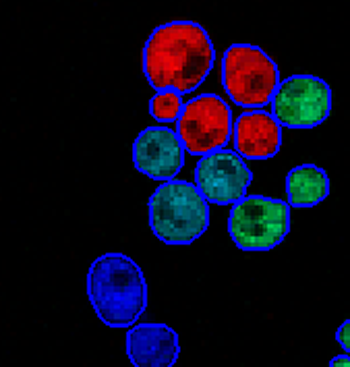
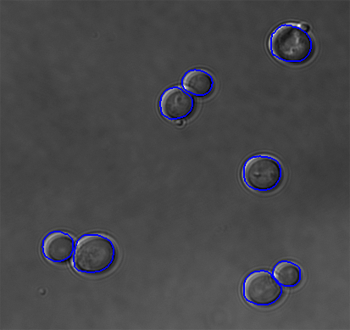
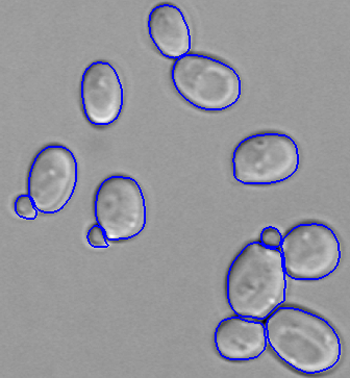
Examples generated by YeastSpotter across several microscopy modalities. Colored outlines show the detected cell boundaries.




Example Postprocessing Scripts
YeastSpotter outputs 16-bit integer-labeled TIFF images. A value of 0 is background; each positive integer identifies one cell.
Using results in ImageJ or Fiji
Open the downloaded TIFF directly as a 16-bit image. Pixel value 0 is background, and values 1, 2, 3, and so on are individual cells. For label-aware measurements or conversion to regions of interest, use a label-image tool such as MorphoLibJ rather than thresholding all nonzero pixels together, which can merge touching cells.
Frequently Asked Questions
How should I cite YeastSpotter?
Please cite the YeastSpotter application note in Bioinformatics. The underlying model is based on Mask R-CNN and was trained from the BBBC038 dataset.
How are output files formatted?
Each output is a 16-bit integer-labeled TIFF. Background pixels are 0, and every detected cell has its own positive integer label. The scripts above demonstrate how to load this format.
Are my images uploaded or stored?
No. Model setup and segmentation run entirely in your browser. Images and results remain on your computer and are not sent to the YeastSpotter maintainers or Google Analytics. YeastSpotter uses Google Analytics to measure basic site usage and workflow success. It records events such as model setup, segmentation, backend type, coarse batch size, timing, and result downloads, but never filenames, image dimensions, cell counts, image contents, segmentation results, or raw error messages.
Why does the initial model setup take time?
The browser downloads approximately 255 MB of model data and initializes a hardware-accelerated inference backend. Setup is required once while the page remains open. Reloading, closing the tab, or navigating away requires setup again, although cached files can make it faster.
Why is a batch limited to 25 images?
There is no server queue: images are processed sequentially on your computer. The limit protects browser memory because original previews, overlays, and downloadable results remain available until the batch is cleared. For larger batches, use the local Python application.
What if segmentation is slow?
Keep this tab open and check the backend shown with the result. WebGPU and WebGL are fastest. CPU compatibility mode is slower but is selected automatically when the browser cannot run the model reliably on the GPU. Smaller images also finish more quickly.
What technology does YeastSpotter use?
YeastSpotter uses a Mask R-CNN model transferred from the Deep Retina Data Science Bowl project. This release converts that model to TensorFlow.js so inference can run locally in a web browser.
Contact
YeastSpotter is maintained by the Moses Lab at the University of Toronto. Questions, bug reports, and feedback are welcome.